











 PhotoCraft
 FilmCraft
 LightCraft
 VectorCraft
 PdfCraft
 EffectCraft
 DesignCraft
 WordCraft
 GridCraft
 DeckCraft
 CADCraft
 SoundCraft
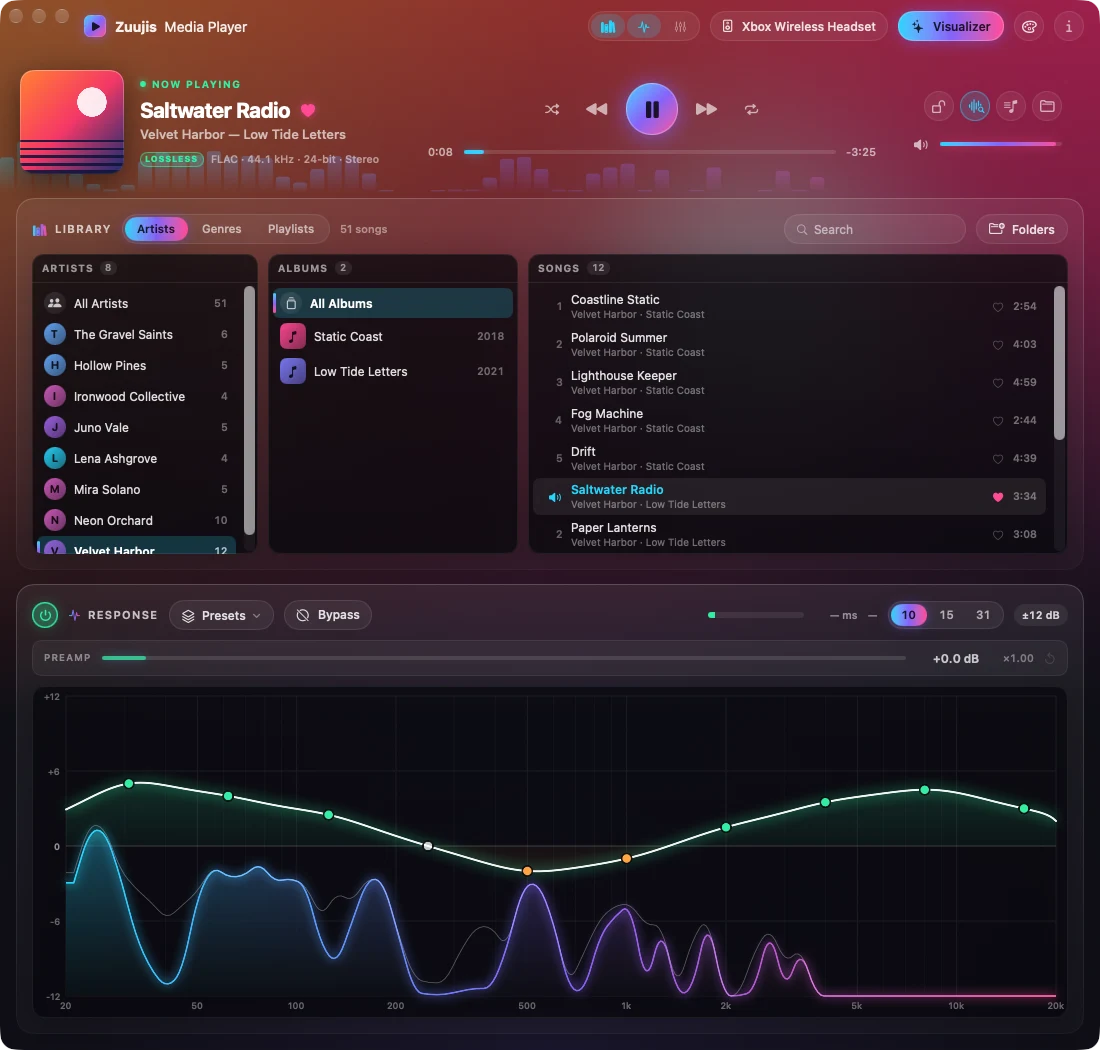
Zuujis Media Player plays your music library, from lossless FLAC, ALAC, WAV and AIFF files to MP3 and AAC, through a 10, 15 or 31 band equalizer. The same equalizer can also shape everything else your Mac plays (videos, games, calls) on whichever speakers or headphones you are using, with no virtual audio driver to install.
What it does
- Plays FLAC, ALAC, WAV, AIFF, MP3 and AAC files, with a queue, saved playlists, gapless playback and Now Playing.
- A music library you browse by artist, genre or playlist, with search, favorites and tag editing that can write changes back into FLAC and MP3 files.
- Shows each song's cover art, and the window takes on the cover's colours.
- A 10, 15 or 31 band graphic EQ from 20 Hz to 20 kHz, with up to 24 dB of boost or cut per band, master gain up to +24 dB and 17 built-in presets.
- Equalizes the whole Mac, not only the player, with a separate profile for each output device.
- A response graph that draws the EQ curve over the live spectrum. Drag across it to draw the curve you want.
- Can switch the output device to each track's sample rate, and has an optional exclusive output mode.
- A visualizer window with 50 audio-driven modes, and import for MilkDrop presets.
How it works
The built-in player sends your files through the equalizer on an audio path of its own, separate from the system route, so nothing is equalized twice. With the equalizer off, the player plays flat.
To equalize the rest of the Mac, it uses process taps, added in macOS 26. When you turn the equalizer on, the app creates a tap on the Mac's output and a private audio device that joins it to your real speakers or headphones. It runs the captured sound through the equalizer and plays the result, while macOS mutes the original so you hear only the equalized version.
The tap and the audio device are private, so other apps never see them, and pressing the power button again removes them. There is no kernel extension, audio driver, login item or background service. Your library list, playlists, presets and settings are stored in your user Library; your music files stay where they are.
What you need
- A Mac with Apple silicon (M1 or later).
- macOS 26 (Tahoe) or later.
- Xcode 26 or later, free from the Mac App Store.
Install
Open Terminal and run these commands in order.
1. Download and build
git clone https://github.com/zuujiscom/zuujis-media-player.git
cd zuujis-media-player
xcodebuild -project ZuujisMediaPlayer.xcodeproj -scheme ZuujisMediaPlayer -configuration Release -derivedDataPath build
2. Install and open the app
cp -R build/Build/Products/Release/"Zuujis Media Player.app" /Applications/
open /Applications/"Zuujis Media Player.app"
This copies the app into your Applications folder. You can also drag it there in Finder from build/Build/Products/Release.
Use it
- Add your music with Add Music Folder… (or the Folders button in the Library), then double-click a song to play it.
- To equalize the whole Mac, press the power button in the header of the Response or Equalizer box. The first time, macOS asks for permission to capture audio. Allow it.
- Move the sliders, or pick a preset with the Presets button. Press the power button again to stop, and your Mac's audio returns to normal.
Updating, uninstalling and troubleshooting are covered in the full setup guide. Found a problem? Open an issue on GitHub.
Credit and license
Released under the GPL-3.0-or-later license. It is free to use, change and share under that license's terms.